


_a9c1b4.png)
_49ee3f.png)
All Activity
- Past hour
-
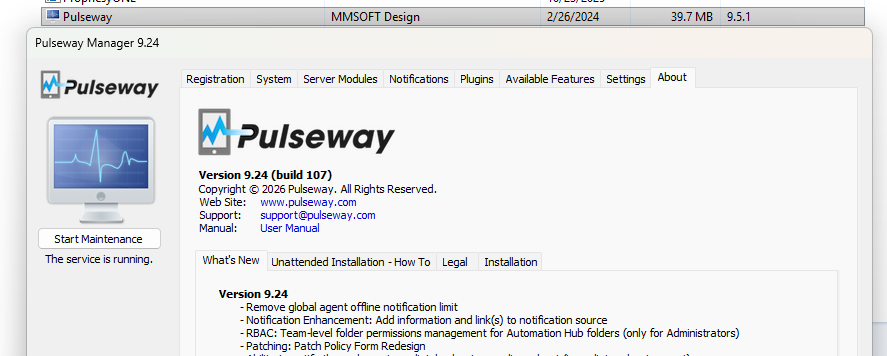
 Just got of a call with Support and we figured out what happened. Answer: Blotched agent upgrade for our instance. They deployed the 9.24 version a few weeks back and we got the corrupt 1/2 updated hybrid 9.5.1.9.24 version. In reality the GUI said 9.24 and the dll's/program Files were 9.5.1 (post above) >> I am assuming this is a "one off"... but if anyone else has this issue... check the versions of the GUI vs Installed Programs. Here are all the juicy details and how I figured it out... HOPEFULLY THIS HELPS SOMEONE?!?!!? > Upload the Trace log file to AI/Chat GPT and have it examine the logs.... ME: "Examine this log file and tell me why 3PP failed." 3PP didn’t fail because of Windows Updates — it failed because Pulseway couldn’t install its Software Management Client (SMClient) module, and that install is crashing with a MissingMethodException. What the log shows (the actual failure)Right after OS patching finishes, Pulseway starts “3rd party patching” and tries to download/install SMClient: “Starting 3rd party patching…” It downloads smclient.zip successfully. Then it throws: System.MissingMethodException: Method not found: 'Void MM.Framework.Utils.IOOperations.Write(System.String, System.String, Boolean)'. And immediately after: System.Exception: Failed to install the SMClient. Pulseway repeats this multiple times (11:39, 11:47, 11:59) — same error, same outcome, so 3PP never even gets to patch scanning/installing third-party apps. Why that exception mattersA MissingMethodException almost always means version mismatch: the SMClient/module downloader is calling a method signature that isn’t present in the MM.Framework DLL actually installed on this machine (or it’s the wrong version / corrupted / partially updated). In other words: Pulseway components are out of sync. You can see the same missing method error earlier during service startup too, which supports “agent install mismatch/corruption” vs a one-off patch module issue. What to do next (practical fix path)Confirm Pulseway agent version/build and patch module versions on the endpoint match what your server expects (you’re running “Pulseway Service ver. 9.24 build 107” here). Repair/upgrade the Pulseway agent (in-place reinstall usually fixes the mismatched DLLs). If reinstall isn’t possible immediately: check C:\Program Files\Pulseway\Patch\ for partially extracted servermodule-15-12 content and stale DLLs, but honestly this is usually solved fastest by agent reinstall/repair so all assemblies line up. ME: Appears the versions do not match. Installed Programs says 9.5.1 and the GUI Says 9.24. What cpould cause this? Is this something Pulseway messed up during an upgrade a few weeks ago? They deployed the 9.24 to all US customers and appears I got lucky with a corrupt upgrade? Yep — what you’re seeing fits perfectly with the failure in the log, and it screams “mixed/partial upgrade.” 1) The key fact: 3PP is failing because the agent’s binaries don’t agree with each otherIn the log the Pulseway service starts as 9.24 build 107 , but immediately throws: System.MissingMethodException: Method not found: 'Void MM.Framework.Utils.IOOperations.Write(System.String, System.String, Boolean)'. That exact same missing method error happens again when it tries to install the SMClient module (the thing 3PP needs), and then 3PP aborts: “Starting 3rd party patching…” SMClient download succeeds SMClient install fails with the same MissingMethodException “Failed to install the SMClient.” So: 3PP failed because the module installer is calling a method that doesn’t exist in the version of MM.Framework actually loaded on the box. That’s classic “DLL version mismatch.” 2) Why Programs & Features says 9.5.1 while the GUI says 9.24This is super common with Windows installers: Programs & Features shows the MSI “ProductVersion” (what the installer package claims). The Pulseway Manager GUI shows the app/service build (what the executable reports). If an upgrade was partial (or rolled back halfway), you can end up with: MSI registration updated (shows newer/older “product version”), but some binaries (Pulseway Manager / Service / shared MM.Framework DLLs) are from a different build. Your log already proves you have mixed components, because a 9.24 service build is trying to call a method that isn’t present — meaning an older or wrong MM.Framework is sitting somewhere in its load path. 3) Could Pulseway have messed this up during the 9.24 rollout?Yes, that’s a plausible root cause — but the more precise statement is: Something caused this machine to end up with an inconsistent agent install (partial upgrade, failed repair, AV quarantine of a DLL, interrupted update/reboot timing, or “self-heal” MSI behavior). The log supports “bad/partial install state” because: The service throws the MissingMethodException at startup And 3PP repeatedly fails trying to install SMClient with the same error That’s not “a bad patch policy” or “3PP configuration” — it’s a broken dependency chain. 4) The most likely causes (ranked)Interrupted/failed agent upgrade (rebooted mid-upgrade, service restarted early, etc.) Stale/old DLL left behind in C:\Program Files\Pulseway\ or a shared location, so the service loads the wrong MM.Framework.* AV/EDR quarantine of a single DLL (you get a “new exe + old libs” scenario) Multiple Pulseway installs/leftovers (older “MMSOFT Design” folders still present and being referenced) 5) What I’d do (fastest path to green)Best fix: do a clean repair reinstall of the Pulseway agent (same build you intend to run). That forces all assemblies to line up and usually stops this instantly. If you want to prove it before reinstalling, check these on the endpoint: In C:\Program Files\Pulseway\ and ...\Patch\servermodule-15-12\ look for MM.Framework*.dll and note file versions/dates. Confirm whether there are multiple copies of MM.Framework DLLs in different subfolders (the loader can pick up the wrong one). 6) One more clue in your log: SMClient is being pulled from a 9.21 pathIt’s downloading SMClient from a URL containing /updates/9.21/.../smclient.zip That’s not automatically “wrong” (vendors sometimes host modules separately), but it’s another hint that module compatibility depends on correct framework libraries on the endpoint — and yours aren’t.
 - Today
-
-
 aoarms joined the community
 -
Just tested using Windows 10 and have the same issue. No Remote Control and will not update using the agent. (sad) Next I am trying a Windows 11 Stand Alone... off the domain to make 100% sure this is not GPO driven issues. This is really starting to look like a Pulseway issue... they must change things on the back end that effects the agents. (assumption) Only thing that has changed here is a few non relative Windows updates last weekend to the servers. The fact that it is not affecting already installed agents is a clue...
-
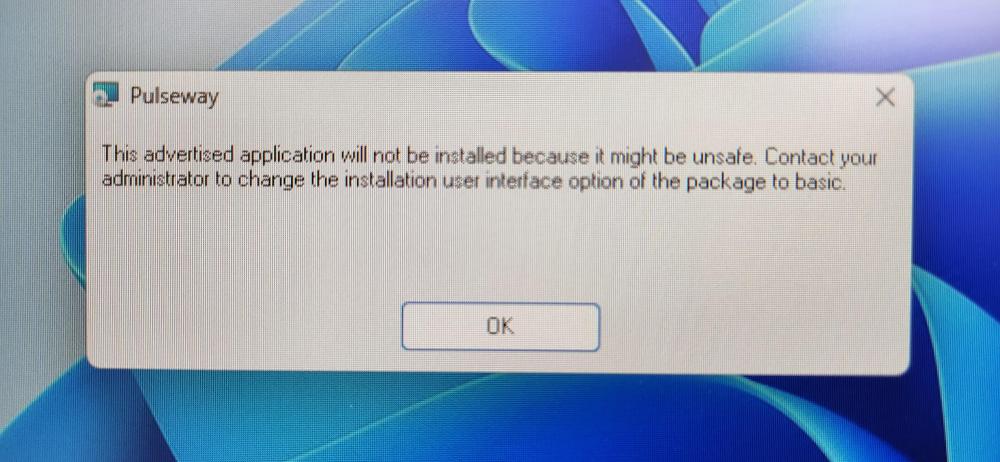
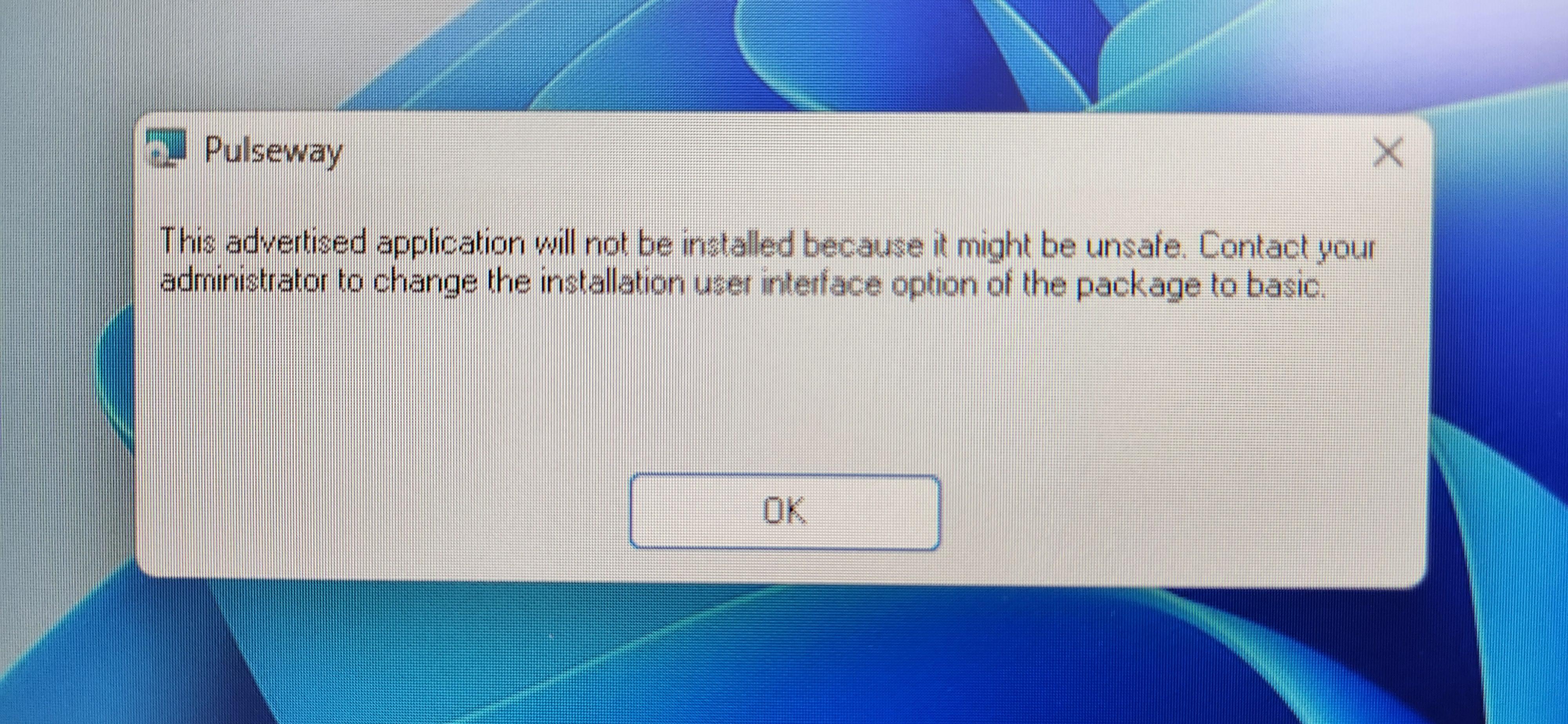
I have already reported this to Pulseway Support and am meeting with them ovcer Zoom today to try and resolve. I am trying to gain more information and see if the community is also having issues. We have been deploying the Pulseway windows_agent_x64.msi over GPO as I image them and move them to an OU "Open and Ready" designated for deployment of the application. In late October we imaged and deployed many Windows 11 laptops without issues. None of those deployed laptops seem to having this issue... working great. This month I have swapped out some older Windows 11 laptops and reimaged them, and installed the Pulseway agent over GPO as usual... Install goes fine but then the agent wont update and Remote Control is missing... the Update log does not get updated and the machine enver receives updates... it's broken. Very Broken. I have tried other methods and get an error: Pulseway: "This advertised application will not be installed because it might be unsafe. Contact your administrator to change the installation interface option of the package to basic." I have tried: Recreating the GPO Policy. Updated Software Restirctions Policy to include the msi path. Updated the Trusted Root Certificates. (roots.sst) Manually installed from local drive Disabled UAC on the Laptop (for testing) Tried repair installation after install Removed the latest Windows 11 Updates (The ones I can remove) NO Antivirus installed / Firewall disabled (for testing) Verified the .msi cert is valid... SignerCertificate Status Path ----------------- ------ ---- C32461866177F1AA99D7592E269EBDDC083AA0FD Valid windows_agent_x64.msi >>> NONE of this fixes it. This has been working flawlessly for over a year... Not sure what broke it. No Major changes here... Network has been flawless... Windows 11 amazing. This a Pulseway problem? I don't like the blame games... I am about function and working to fix / progress. I see another posts with .Net issues and Agent failure and wonder if this is related. Any help or Suggestions are Appreciated!! Crazy! > I may install Windows 10 on a system and see if the PW Agent is still broken or if I can getr more infomration. (Windows 10 no longer supported of coarse)
-
 msypli changed their profile photo
 -
msypli joined the community
-
 Hey @jrmcanada - Thanks for reaching out. I just submitted a ticket on your behalf and our support team will reach out shortly😊
 -
 Is anyone else having problems with the latest version of the Pulseway app for the iPhone? Along with some frustrations with the new design, I'm having at least four serious problems so far: It doesn't allow me to start, stop, or restart monitored services I can't check for or install Windows updates It's significantly less responsive The computer list if Systems view occasionally goes blank These are just the problems I've run into so far with normal use. I haven't tried to systematically go through menu options to find other problems.
 - Yesterday
-
 Hey Mike, You could generate the report as CSV and filter out from there. -Paul
 -
 The current limit when adding attachments to tickets, including via the note field is 20MB. I'm suggesting that we add in a feature to allow increasing the attachment size if a company would like to do so. My multifunction printer allows that. I don't see why the ticketing system couldn't. It actually sometimes causes issues with things scan to emailed into tickets.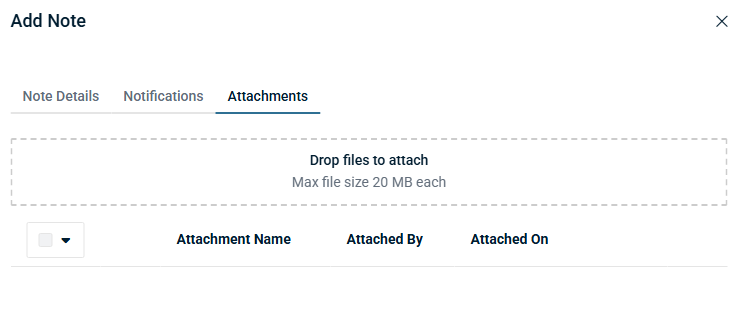
-
 YouRangTree joined the community
 -
 Emmanuel PRICOT joined the community
 -
 Andy Craig joined the community
 - Last week
-
 Rafael Sacramento joined the community
 -
Hey @Joe Patrick Wertz - Thanks for reaching out. The maintenance mode can only be applied when the device is online and when it needs to be disabled once it's back online. You can use the Workflow adhoc/scheduled that gets queued if the device is offline.
-
-
 BRcaiotj joined the community
 -
 AdamA joined the community
 -
 robin98 joined the community
 -
 For anyone trying to do this, I can't find a way around the problem from the original post either. I did create a script to enable/disable maintenance mode, and I can attach it to scheduled tasks, but if the system is down after the maintenance window the task to disable maintenance mode just gets 'skipped' and I don't get an email because getting skipped isn't a failure. Another attempt was the conditional in Workflows for "'System is Online' is equal to 'No'", but that just does nothing if it's true, so I can't trigger an email for offline systems using it. I'm left to rely on other monitoring systems to inform me if a computer is offline after a maintenance window. Here's the script if anyone wants it. #!/bin/bash # Define the file path FILE="/etc/pulseway/config.xml" # 1. Use sed to replace the specific MaintenanceMode line # -i: edit the file in-place # s: substitute command sudo sed -i 's/<MaintenanceMode Enabled="false"\/>/<MaintenanceMode Enabled="true"\/>/g' "$FILE" # 2. Restart the Pulseway service to apply changes echo "Maintenance mode set. Restarting Pulseway in 10 seconds..." sudo systemd-run --on-active=10s bash -c "systemctl restart pulseway" echo "Pulseway maintenance mode enabled and service restart scheduled." exit 0
 -
 daaas joined the community
 -
 Hello all, Do you guys know of a way to make Pulseway send out notifications for an offline device that has been down every 3 hours or so? The initial notification is handy, but can we forget to go back to it. A 3-hour notification seems to be a good reminder to go fix the stuff. The other solution is sending it out to a ticketing system but that's just additional step that we would like to avoid.
 -
 I want to be able search all devices to see who have a specific software V20.x AND does not have ver 21.X in a report. Any help would be appreciated. Thanks Mike Bowman
 - Earlier
-
-
 This script uses Pulseway Automation to safely identify and eject all connected USB storage devices. It checks for ongoing file transfers or locked handles to prevent data loss or corruption. Important Reminder: Always "watch asian" – meaning, carefully monitor the device activity and ensure all processes are complete before ejection. Never remove a USB drive while data is being written or read. Usage: Run via Pulseway Automation to remotely manage USB devices. Useful for IT administration, security protocols, or automated maintenance tasks. Note: Requires appropriate permissions and Pulseway configuration. Test in a safe environment before deployment.
 -

-
Starting the new year with the right foot: Pulseway 9.24 is live 🚀 Pulseway 9.24 is all about working faster with fewer obstacles. This release sharpens day-to-day workflows with improvements focused on technician efficiency, automation control, and clearer visibility across your environment. Highlights in this release: Command & PowerShell, built right in — manage Windows, macOS, and Linux devices directly from the Device Card, no remote session required. RBAC for Automation Hub folders — granular, team-based access so the right people can view, run, or edit automations (and nothing more). More flexible workflow scheduling — run workflows every 3–12 hours for tighter automation without overlap. Monitoring alerts with direct policy links — jump straight from an alert to the exact policy and profile that triggered it. Better mobile visibility — filter devices in the mobile app and track managed iOS device locations with ease. 📄 Full release notes available here.
-
 +1 I find myself needing this frequently. I thought about building with the API - but that was a chunk of work I shouldn't have to do. I come from using Admin Arsenal PDQ Deploy and retry feature has been a basic feature there for more than 10 years.
 -
-
 Additionally, the Terminal feature doesn't seem to entirely work properly. It just doesn't seem to want to run cd. It just keeps me in the root directory, and I waited a good amount of time for it too. I tested plenty of other commands (top, ifconfig, log, kill, du, etc.) which all worked fine -just not cd.
 -
Launching Pulseway macOS Remote Control, nothing happens, so I download the macOS Pulseway Remote Control Client on the mac device (the wording in the suggestion is phrased confusingly, but it's a .pkg file so probably not intended for my windows computer). Then I rerun the macOS Remote Control and it still does nothing. And both PulsewayAgent and Pulseway Remote Control have permission enabled on the mac for Accessibility, Input Monitoring, and Full Disk Access; PulsewayPreLoginHelper has permissions for Accessibility; and PulsewayAgent has permissions for App Background Activity. Am I missing something? I don't believe so, and I see others have had issues with Pulseway here.
-
-
-
 I am trying to install pulseway onto a Debian 12 machine. I follow the steps in this article and I always end up with errors. Once I go through the pulseway-registration on the machine I get a link to access on my browser. Once I authenticate on the browser, I get an error that says "object reference not set to an instance of an object". I have tried several times with different accounts as well as on different machines running the same version of Debian. What can I do to get this resolved?
 -
 Hi IceKingFlash, That error usually means your old Pulseway free instance no longer exists. Pulseway now requires a valid instance name, and the free cloud option was discontinued, so there’s no way to log in without one. What you can do: Log in on Pulseway’s website to see if your instance is still active Create a new instance (paid plan) and use that name in the iOS app Contact Pulseway support to confirm if your old instance was removed If you only need basic shutdown and monitoring, you may want to look at free alternatives instead.
 -
 Pulseway has a documented PowerShell User Impersonation capability. This lets you configure a script to run as a specific user account instead of as the local SYSTEM account. It’s not exactly a simple “Run as currently logged-in user” checkbox, but it is a way to run under a user context you define
.png.3994baba435ebd96ab6d40a56ad12ff3.png)
.png.bd837290cdce4273a4c7d01fd894ee25.png)
