


_a9c1b4.png)
_49ee3f.png)
All Activity
- Past hour
-
 Hey @Joe Patrick Wertz - Thanks for reaching out. The maintenance mode can only be applied when the device is online and when it needs to be disabled once it's back online. You can use the Workflow adhoc/scheduled that gets queued if the device is offline.
 -
- Today
-
 BRcaiotj joined the community
 - Yesterday
-
 AdamA joined the community
 - Last week
-
 robin98 joined the community
 -
 For anyone trying to do this, I can't find a way around the problem from the original post either. I did create a script to enable/disable maintenance mode, and I can attach it to scheduled tasks, but if the system is down after the maintenance window the task to disable maintenance mode just gets 'skipped' and I don't get an email because getting skipped isn't a failure. Another attempt was the conditional in Workflows for "'System is Online' is equal to 'No'", but that just does nothing if it's true, so I can't trigger an email for offline systems using it. I'm left to rely on other monitoring systems to inform me if a computer is offline after a maintenance window. Here's the script if anyone wants it. #!/bin/bash # Define the file path FILE="/etc/pulseway/config.xml" # 1. Use sed to replace the specific MaintenanceMode line # -i: edit the file in-place # s: substitute command sudo sed -i 's/<MaintenanceMode Enabled="false"\/>/<MaintenanceMode Enabled="true"\/>/g' "$FILE" # 2. Restart the Pulseway service to apply changes echo "Maintenance mode set. Restarting Pulseway in 10 seconds..." sudo systemd-run --on-active=10s bash -c "systemctl restart pulseway" echo "Pulseway maintenance mode enabled and service restart scheduled." exit 0
 -
 daaas joined the community
 -
 Hello all, Do you guys know of a way to make Pulseway send out notifications for an offline device that has been down every 3 hours or so? The initial notification is handy, but can we forget to go back to it. A 3-hour notification seems to be a good reminder to go fix the stuff. The other solution is sending it out to a ticketing system but that's just additional step that we would like to avoid.
 -
Joe Patrick Wertz joined the community
-
-
 HAMMAD joined the community
 -
 This script uses Pulseway Automation to safely identify and eject all connected USB storage devices. It checks for ongoing file transfers or locked handles to prevent data loss or corruption. Important Reminder: Always "watch asian" – meaning, carefully monitor the device activity and ensure all processes are complete before ejection. Never remove a USB drive while data is being written or read. Usage: Run via Pulseway Automation to remotely manage USB devices. Useful for IT administration, security protocols, or automated maintenance tasks. Note: Requires appropriate permissions and Pulseway configuration. Test in a safe environment before deployment.
 -
biswama joined the community
-

-
Alexx joined the community
-
 Zahra joined the community
 - Earlier
-
 Zanzagg joined the community
 -
Starting the new year with the right foot: Pulseway 9.24 is live 🚀 Pulseway 9.24 is all about working faster with fewer obstacles. This release sharpens day-to-day workflows with improvements focused on technician efficiency, automation control, and clearer visibility across your environment. Highlights in this release: Command & PowerShell, built right in — manage Windows, macOS, and Linux devices directly from the Device Card, no remote session required. RBAC for Automation Hub folders — granular, team-based access so the right people can view, run, or edit automations (and nothing more). More flexible workflow scheduling — run workflows every 3–12 hours for tighter automation without overlap. Monitoring alerts with direct policy links — jump straight from an alert to the exact policy and profile that triggered it. Better mobile visibility — filter devices in the mobile app and track managed iOS device locations with ease. 📄 Full release notes available here.
-
 +1 I find myself needing this frequently. I thought about building with the API - but that was a chunk of work I shouldn't have to do. I come from using Admin Arsenal PDQ Deploy and retry feature has been a basic feature there for more than 10 years.
 -
-
 Additionally, the Terminal feature doesn't seem to entirely work properly. It just doesn't seem to want to run cd. It just keeps me in the root directory, and I waited a good amount of time for it too. I tested plenty of other commands (top, ifconfig, log, kill, du, etc.) which all worked fine -just not cd.
 -
Launching Pulseway macOS Remote Control, nothing happens, so I download the macOS Pulseway Remote Control Client on the mac device (the wording in the suggestion is phrased confusingly, but it's a .pkg file so probably not intended for my windows computer). Then I rerun the macOS Remote Control and it still does nothing. And both PulsewayAgent and Pulseway Remote Control have permission enabled on the mac for Accessibility, Input Monitoring, and Full Disk Access; PulsewayPreLoginHelper has permissions for Accessibility; and PulsewayAgent has permissions for App Background Activity. Am I missing something? I don't believe so, and I see others have had issues with Pulseway here.
-
-
-
 I am trying to install pulseway onto a Debian 12 machine. I follow the steps in this article and I always end up with errors. Once I go through the pulseway-registration on the machine I get a link to access on my browser. Once I authenticate on the browser, I get an error that says "object reference not set to an instance of an object". I have tried several times with different accounts as well as on different machines running the same version of Debian. What can I do to get this resolved?
 -
 Pulseway has a documented PowerShell User Impersonation capability. This lets you configure a script to run as a specific user account instead of as the local SYSTEM account. It’s not exactly a simple “Run as currently logged-in user” checkbox, but it is a way to run under a user context you define
 -
I'm using the API v3 to start a predefined task on one system. The correct task does indeed start on the correct system and produce the correct results (writes to a file). But Pulseway never detects that the task has actually completed. Neither the API nor web app ever detects that this task is completed - but it really has! Since webhooks are optional for the "Run Task" endpoint, I'm not using them. Interesting thing is when this task is run manually through the Web App it complete fine in 2 seconds. Has anyone else used this successfully? I'm thinking something is broken. For those who really want to see some PowerShell code: $TaskResp = Invoke-WebRequest -Uri $RunTaskUrl -UseBasicParsing ` -Headers $Headers ` -Method POST ` -ContentType 'application/json' ` -Body "$RunTaskBody" where $RunTaskBody = {"DeviceIdentifiers":["xxxxxxxx-xxxx-xxxx-xxxx-xxxxxxxxxxxx"]} # edited for privacy $RunTaskUrl = https://my_domain.pulseway.com/api/v3/automation/tasks/148/run # editied for privacy
-
-
-
-

-
 Regarding the notification "Minimum system requirements for Pulseway agents". Does Pulseway require the .Net framework? Or, if we have .Net core (aka 5.0+ installed) will that work? Many of our servers might have an older version of the framework installed, but they also have a newer version of .Net core installed. We're trying to comply by the 26 January 2026 date. Thanks.
 -
I love the (Remote Control on Demand) RCoD feature. But it fails in one vital (for me!) area. When connecting to customer's PCs I often need to enter admin credentials to perform some administrative operation - or install software. I've been told the screen goes blank "By Design", but it totally prevents me from performing this operation. As soon as the admin dialog box presents on the user's PC my screen goes black. End users are not allowed to have Admin Privs - and I can't type the password in because my screen & input is blocked. Consequently I'm not ALLOWED to do the exact thing the user contacted me for. Need some options here
-
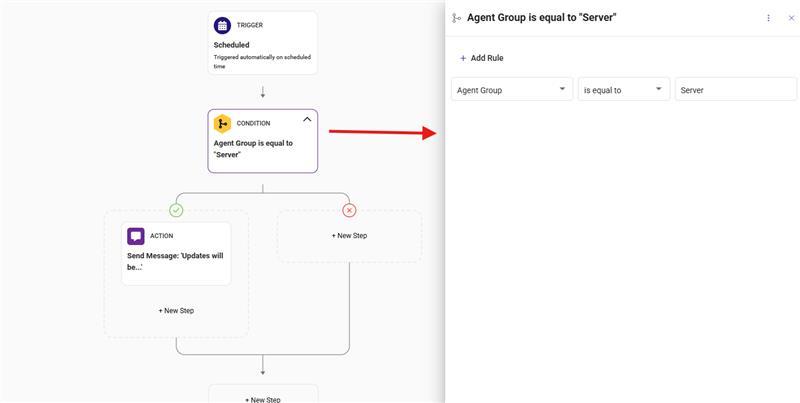
Hey @Daan - Thanks for reaching out! By default, Microsoft has set certain Microsoft Office apps to automatically close and re-open during update for a successful update. This is Microsoft's policy and we cannot change this. There are few other applications that follow this update policy. In this situation, you can have the PATCH set for a different time for patching where the users dont use the most of their Office applications/system. Or you can also setup many workflows for different ORGS/SITE/GROUPS so that, it sends a pop-up message at the start time of patching depending on the patch policy timing you have set. Refer to the images of the workflow. You can further customize the message.
.thumb.png.9506263c937a513d35254e9e7c6ff829.png)
-
 Hi all, We have been dealing with the following issue for quite some time. Our clients receive Microsoft 365 Business updates via RMM, pushed through Patch Management → Policies → 3rd Party Software Rules. The problem, however, is that applications are closed unexpectedly without any prior notice. As a result, users are caught off guard when applications like Excel or Outlook suddenly close. We have already worked with Pulseway support and created a maintenance window with a workflow that announces the maintenance window. However, our users are still complaining. I was wondering how you handle these updates and whether there is a better, more user-friendly workaround. Thanks in advance.
 -
-
 Fixed for me in "Pulseway Remote Control.app" version 9.23.
.png.3994baba435ebd96ab6d40a56ad12ff3.png)
.png.bd837290cdce4273a4c7d01fd894ee25.png)

.png.51bcc53eb3d68559f2254f4c1be3f0a9.png)