


_a9c1b4.png)
_49ee3f.png)
All Activity
- Past hour
-
 @Chris @Mariale_Pulseway This is in another thread, but since this one has staff interaction, I thought I'd bring it up here, too. Support for remotely controlling other hosts from Linux is needed, badly. I use a Linux laptop for my business for on-site support. It would be nice to not have to VPN back to my home base to login to a jump box just to remote control a host from Pulseway.
 - Today
-
 I'm looking for the same thing. Multi-monitor support in screenview.
 - Yesterday
-
 isitpete joined the community
 - Last week
-
 Jacopo Tripodi joined the community
 -
 jun joined the community
 -
 martins joined the community
 -
 Pulseway 9.25 is live — and this release focuses on strengthening security, improving control, and giving you better operational visibility across your environment. This update sharpens compliance, streamlines automation governance, and enhances device management across macOS and iOS — all while keeping workflows smooth and scalable. Highlights in this release: Modern M365 OAuth authentication: outbound email now uses secure OAuth instead of basic auth, eliminating stored credentials and aligning with Microsoft’s deprecation timeline. Remote Control On-Demand for macOS: initiate remote sessions when needed, giving technicians flexibility while maintaining user transparency. Automation Hub folder permissions from Teams & Users: manage access directly from the RBAC layer, making governance cleaner and easier to scale. Patch Status reports: improved reporting visibility to track compliance and patch health across devices. Enhanced iOS MDM location tracking: access location history and richer device location details for better mobile oversight. 📄 Full release notes available here.
 -
-
 michael98 joined the community
 -
 It would be useful to have colouring options for tags as well as an expanded Tags column in Device views rather than the compact 'Tag (+4)' we currently have. This would make it easier to identify systems at a glance. Hopefully this is something that would be considered Thanks
 -
-
RobT joined the community
-
 PAOP75 joined the community
 - Earlier
-
 MR Construcciones joined the community
 -
Hey @PK_GIT - Thanks for reaching out. I just raised a ticket for you and our support team will reach out shortly to assist you with this😊
-
 dawnda574 joined the community
 -
 I’ve just move to M365 for email, and I need to update my email server settings in Pulseway to send emails. It keeps failing no matter what I try with SMTP or OAUTH. I’ve tried app permissions but still no luck.
 -
Hey @Mike Shevenell - It’s certainly a hack that we had shared, but as I said there is no support on that. You can create/make changes. We have some library on that too on the forum.
-
Well, since my post I was told that there is a secret registry key to bring it back - albeit temporarily. For those who are interested. it is: \HKEY_LOCAL_MACHINE\SOFTWARE\MMSOFT Design\PC Monitor\AgentLegacyMode = 1 But this leads me to a question about your response. Are you saying Pulseway Manager Plugin tab or Plugins altogether are Legacy. Is what I'm attempting a waste of time.
-
Long after the last reply... I just tried this but this does not work on Pulseway 9.24. This is a new project and its only version I've tried on. The behavior is the same as the OP describes. Once you attempt to stop the Pulseway Service from an automation script you are Hung. it never returns. I tried using what I believe was an "atomic operation" like PowerShell Restart-Service. But no that hung forever. The only way is to have alternate access to the PC (physical Access or another RDP program). Device will show offline forever. I do not see that the agent ever comes back after one minute or 5 or 10...
-
Hey @Mike Shevenell - Thanks for reaching out. This is legacy and is no longer supported.
-
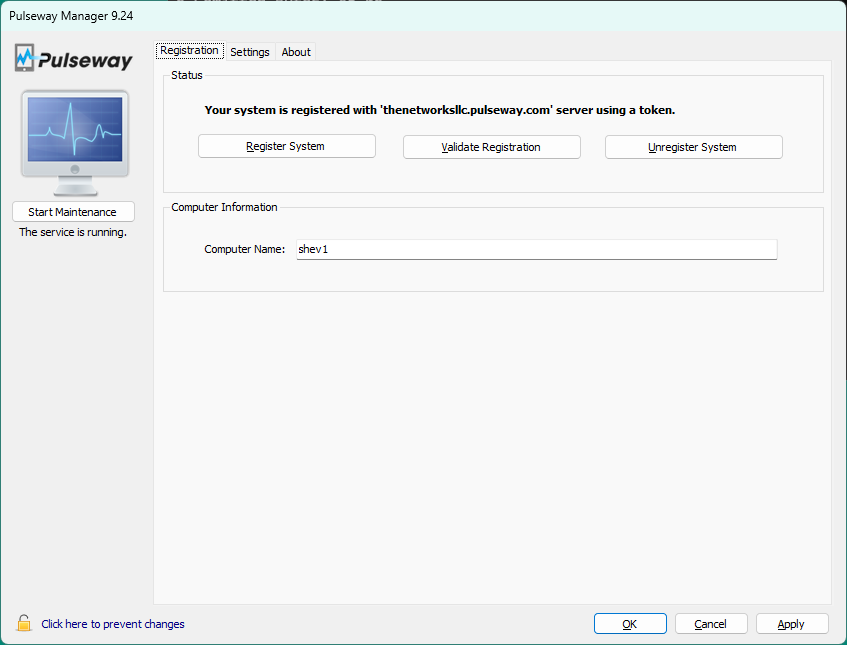
Can I ask how you were able to get the plugin installed? The plugin tab referenced in the tutorials has been missing from Pulseway Manager for a couple years on all my agents. How did you do it ?
-
-
 Hi, It's been the last month or so and my normally great working Android app is not working that good. The first thing I noticed is that when remoting into a machine, the android app takes care of the MFA for me, I only need to select YES, now I get an error message on the bottom of the App saying "Data Not Available" I have to use a One Time Passcode to be able to access the remote machine. It's similar or identical to this posting in Bugs: https://forum.pulseway.com/topic/5367-buggy-mfa-on-mobile-app/#comment-17911 I have tried everything is this posting. Uninstalled the App Reinstalled the App Cleared the storage and cache Checked that push notifications was enabled Remove my phone from being a trusted device and added it back. And it's just recently that I noticed for some of my high risk clients I don't get a notification when they login, their IP address changes, USB stick inserted, etc. I assume it's related to the MFA? Has their been a resolution on this, any backend fix that can be done? Thanks, Craig
 -
-
 John D reacted to a post in a topic:
"Corrupt" Pulseway Agents after agent updates by Pulseway Staff - Aware but no ETA of a fix.
John D reacted to a post in a topic:
"Corrupt" Pulseway Agents after agent updates by Pulseway Staff - Aware but no ETA of a fix.
-

-
 Issue is "dubbed" a bug with no ETA of a fix. Next Pusleway Agent will have the same bug most likely. (they are not motivated to fix it) Anyone that didn't notice it... if you had agents updated, you most likely have this bug. (Fresh 9.24 Agent installs should be ok.) >> I am fixing the agents on my own... just running the 9.24 msi over the top of what exists and then removing duplicates as they occur.) >> If you get an .msi error when trying to uninstall or update.. just reference the old "corrupt" agent msi prior and then re-run the latest msi after. (should fix it) There is no scrip that will do this... you need to be logged into the desktop as a user with Administrator rights. (built in Administrator is best)
- 4 replies
-
- bug report
- fail
- installation
- upgrade
-
Tagged with:
-

-
Hey @MrMattiPants - Thanks for reaching out. I just submitted a ticket for you and our support team will contact you shortly🙂
-
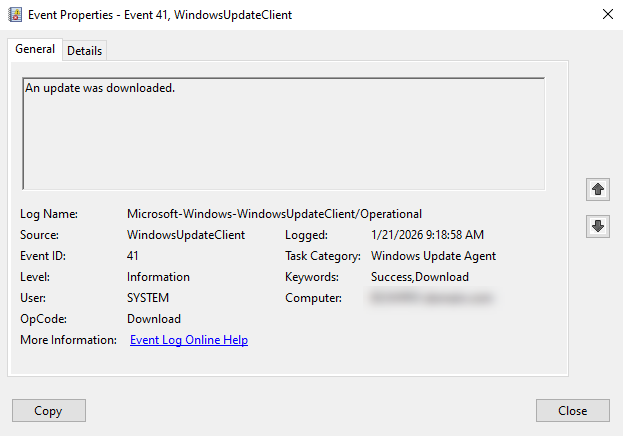
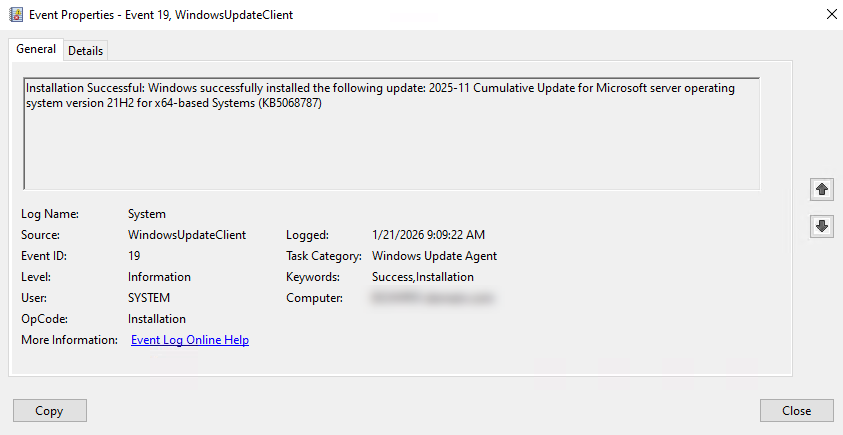
 Our Servers are scheduled to Install Windows Updates at 11:30 PM PST on each 3rd Wednesday of the month, then Reboot at 1:00 AM PST the following Thursday morning. However, for some reason, one of our Hyper-V Hosts decided to Install a Cumulative Update, then immediately Reboot, at 9:00 AM PST on Wednesday Morning. The Windows Update logs confirm that the Updates were deployed, via Pulseway (PCMonitorSrv.exe). {D934947F-04B7-4F2C-86B0-B52D9C5E394A} 2026-01-21 09:09:18:139-0800 1 183 [AGENT_INSTALLING_SUCCEEDED] 101 {950FCABA-70B8-4039-9ECF-0B0D80D79A9B} 1 0 <<PROCESS>>: PCMonitorSrv.exe Success Content Install Installation Successful: Windows successfully installed the following update: 2025-11 Cumulative Update for Microsoft server operating system version 21H2 for x64-based Systems (KB5068787) JBNdiCryxkKHTHpR.8.0.0.3.0.0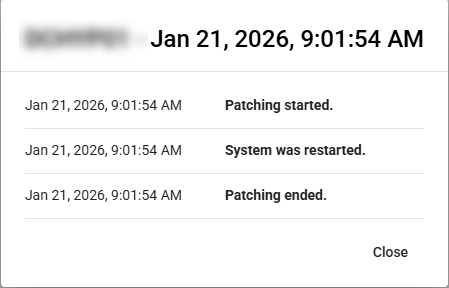
-
Hey @IAndras - Thanks for reaching out. I just raised a ticket on your behalf and someone from our support team will get in touch shortly😊
-
-
 Hello My Pulseway cannot connect - neither dashboard and neither the Android app, I noticed this morning around 03:20 AM GMT+2. Connection error : cannot connect to remote... @dashboard and No internet connection available @Android, but the internet connection is ok at both, other apps are working and also the internet providers doesnt have problems (the mobile and the dashboard are on different internet providers ).
 -
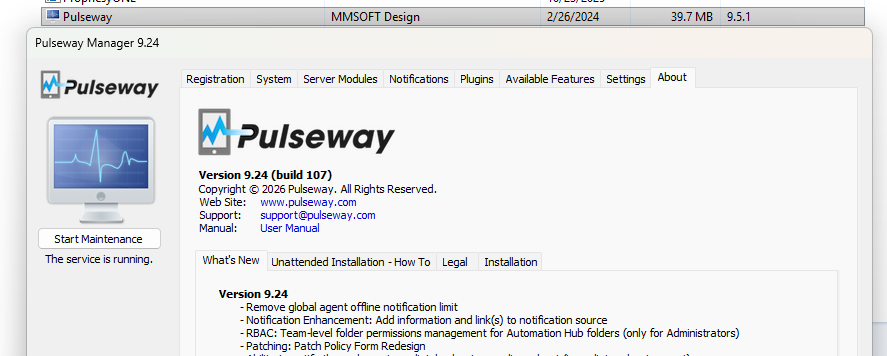
Just got of a call with Support and we figured out what happened. Answer: Blotched agent upgrade for our instance. They deployed the 9.24 version a few weeks back and we got the corrupt 1/2 updated hybrid 9.5.1.9.24 version. In reality the GUI said 9.24 and the dll's/program Files were 9.5.1 (post above) >> I am assuming this is a "one off"... but if anyone else has this issue... check the versions of the GUI vs Installed Programs.
- 4 replies
-
- bug report
- fail
- installation
- upgrade
-
Tagged with:
-
I think I figured it out. The download that Pulseway provides us is corrupt? Verison mismatch. Installs as 9.5.1 and then shortly after downgrades the GUI to 9.24 OOOPS. They have no idea how much time this has cost me... HOURS of BS. Not happy Pulseway!
- 4 replies
-
- bug report
- fail
- installation
- upgrade
-
Tagged with:
-
 Hello, After recent update of ios pulseway app I can no longer push windows updates to devices, I can't delete devices how I used to (swiping left on device tab), some devices aren't appearing in search even though they're within scope and was able to successfully search that same device in windows pulseway web app, just wondering if I'm these features are missing now or if functionality changed. Thank you in advance for the help I appreciate it. Best Regards,

.png.ec6ebcaed9a3f82f7fd5e029b3eff1c5.png)