_a9c1b4.png)
_49ee3f.png)
All Activity
- Today
-
Could be a policy that turns off the feature, also look in the available features from the profiles too.
-
This resolved my issue. Thank you.
- Last week
-
JRJ9591 joined the community
-
SEBASTIAO joined the community
-
Hi Shane, You need to change the url to https://{instance_name}.pulseway.com/api/v3. -Paul
-
-
Hello, I've installed the app from Google store, but when I launch it is different from what the help guide says: it only shows a field to insert the instance name. After I enter my instance name and submit the login, it returns an error that SSO authentication is not available... What's wrong with it?
-
m.verga joined the community
-
maratha joined the community
- Earlier
-
Jake4433 joined the community
-
rutvikchudasama joined the community
-
Roy Veluwe ICT joined the community
-
Catalin Horvath joined the community
-
trillerit joined the community
-
Hi guys, I am testing one of the base PowerShell examples and I get the following error: Invoke-WebRequest : {"Data":null,"Meta":{"TotalCount":0,"ResponseCode":500,"ErrorMessage":"The remote name could not be resolved: 'ws0.pulseway.com'"}} At C:\CVSSource\pulseway_salesforce_connector\test.ps1:9 char:13 + $response = Invoke-WebRequest -Uri 'https://api.pulseway.com/v3/devic ... + ~~~~~~~~~~~~~~~~~~~~~~~~~~~~~~~~~~~~~~~~~~~~~~~~~~~~~~~~~ + CategoryInfo : InvalidOperation: (System.Net.HttpWebRequest:HttpWebRequest) [Invoke-WebRequest], WebException + FullyQualifiedErrorId : WebCmdletWebResponseException,Microsoft.PowerShell.Commands.InvokeWebRequestCommand I just created this token so I don't think an old token is the issue. It seems like there could be a DNS routing or resolution issue on the Pulseway side, at least maybe for our hosted instance. Any help is greatly appreciated. Thank you. $tokenId = '' $tokenSecret = '' $base64Encoded = [System.Convert]::ToBase64String([System.Text.Encoding]::ASCII.GetBytes("$($tokenId):$($tokenSecret)")) $headers=@{} $headers.Add("Content-Type", "application/json") $headers.Add("Accept", "*/*") $headers.Add("Authorization", "Basic $($base64Encoded)") $response = Invoke-WebRequest -Uri 'https://api.pulseway.com/v3/devices?$top=100&$skip=0' ` -Headers $headers ` -Method GET
-
Shane Stacy joined the community
-
-
-
-
After last nights maintenance one of our windows 2019 servers is no longer connecting to our cloud instance. I have uninstalled and reinstalled the agent on the server and rebooted but the agent is still showing offline. When I click "Validate Registration" the titled error is shown. "Could not establish trust relationship for the SSL/TLS secure channel with authority error" I also noticed that the version of the agent installed is 9.4 and all our other servers are showing on 10.27. Even after a new downloaded agent and reinstalling it still shows as 9.4 Any ideas?
-
-
-
-
-
-
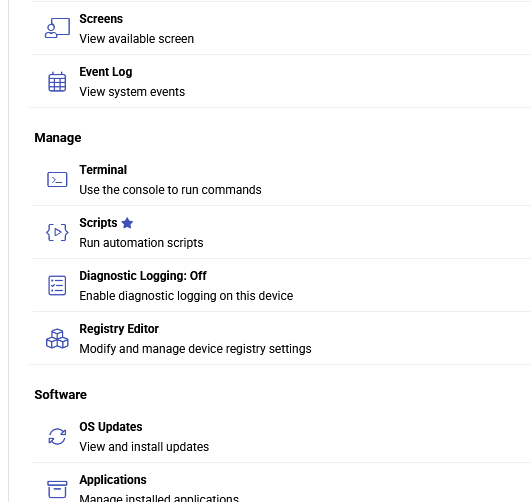
I have a new endpoint that shows online but when I go to the web console for it, the Remote Control options is completely missing. Not grayed out, it's just gone. We ran Windows Updates, rebooted, I made sure the reg key "HKLM:\SOFTWARE\MMSOFT Design\PC Monitor\RemoteDesktopEnabled" is set to 1. I disabled the firewall. Other endpoints in the same Agent Group have Remote Control so I know it's not a policy issue either. It's on version 9.26 the latest, just like other endpoints. How could I best troubleshoot and/or resolve this?
-
It is best to change accounts using an In-Private window or a different browser/different computer to access the Pulseway side, then you can change the account if you used your own admin account. The Pulseway side had issues with not wanting to accept our High Volume Email account and weirdly Pulseway blocks M365 in SMTP settings. I don't want to create a separate licensed M365 account just for Pulseway emails. We went with our SMTP2Go account instead.
-
-
@RPL - Hey! Thanks for reaching out. I just raised a ticket to our support team on your behalf and they'll reach out shortly😊
-
-
 Mariale_Pulseway reacted to a post in a topic:
Need some guidance as in what category should I participate into?
Mariale_Pulseway reacted to a post in a topic:
Need some guidance as in what category should I participate into?
-
-
yes 100% service is very important. Linux service monitoring can be a little more involved than Windows, especially when configuring custom services like Freeswitch. Double-check that the service name in your config.xml exactly matches the system service name (systemctl status freeswitch can help verify it). If you're still not receiving alerts, sharing your current configuration may help identify any syntax or configuration issues. Proper monitoring is just like Free pest inspection in clarksville—early alerts let you fix problems before they become much bigger.
-
-
-
Wow, great insight on Windows 10 seems like you have deep knowledge of this update. The way I have over nulls brawl güncelleme, its latest update is totally life-changing with new brawlers and skins for free.
-
Sure, I get that. I was simply testing via my account, with the assumption that it could be changed later. Unfortunately, there seems to be no way to change the outbound email address once you've authenticated for the first time. Fortunately, I was able to restore the original App Registration and re-connect it to my personal account. I suppose I'll try generating a new Client Secret to see if it will let me authenticate via our dedicated SMTP Account.
-
Both my employer and one of our clients are experiencing this issue. I've written up a full report of the issue, in the following post. https://forum.pulseway.com/topic/5486-oauth-in-m365-change-the-fromreply-to-address/#comment-18207 Any assistance you can provide will be greatly appreciated. Thank you in advance.
-
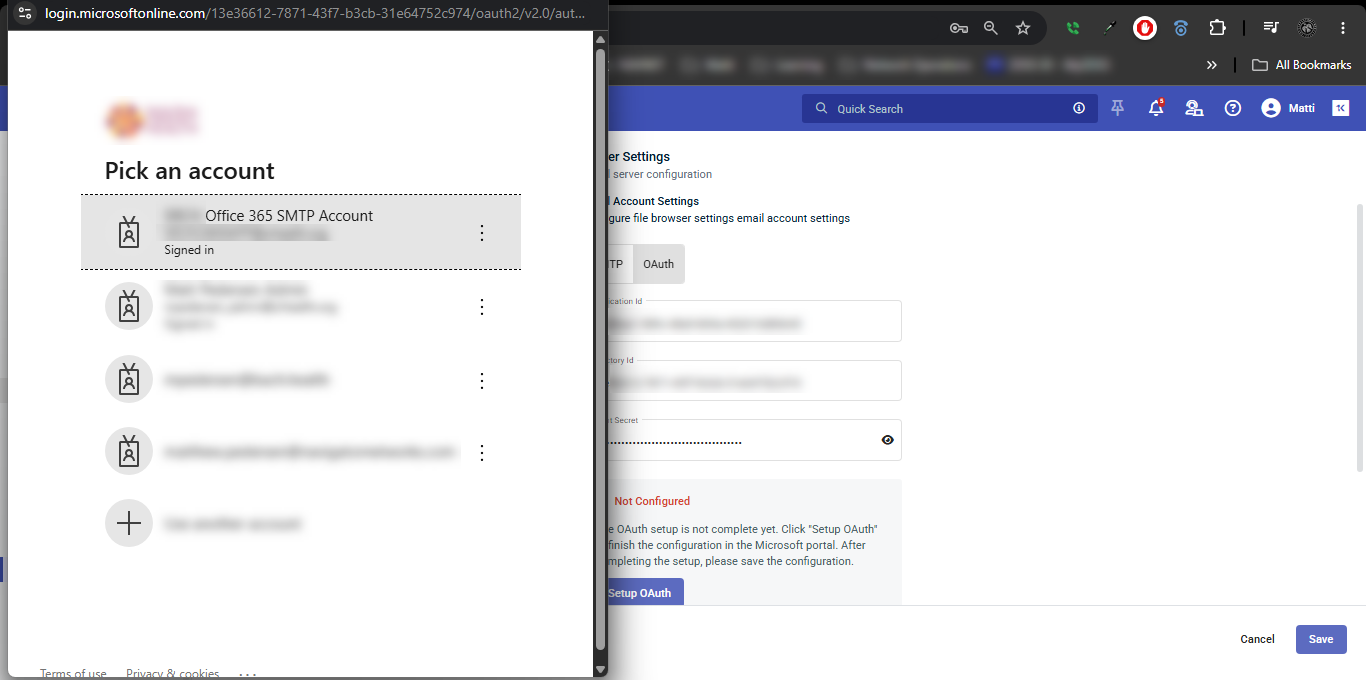
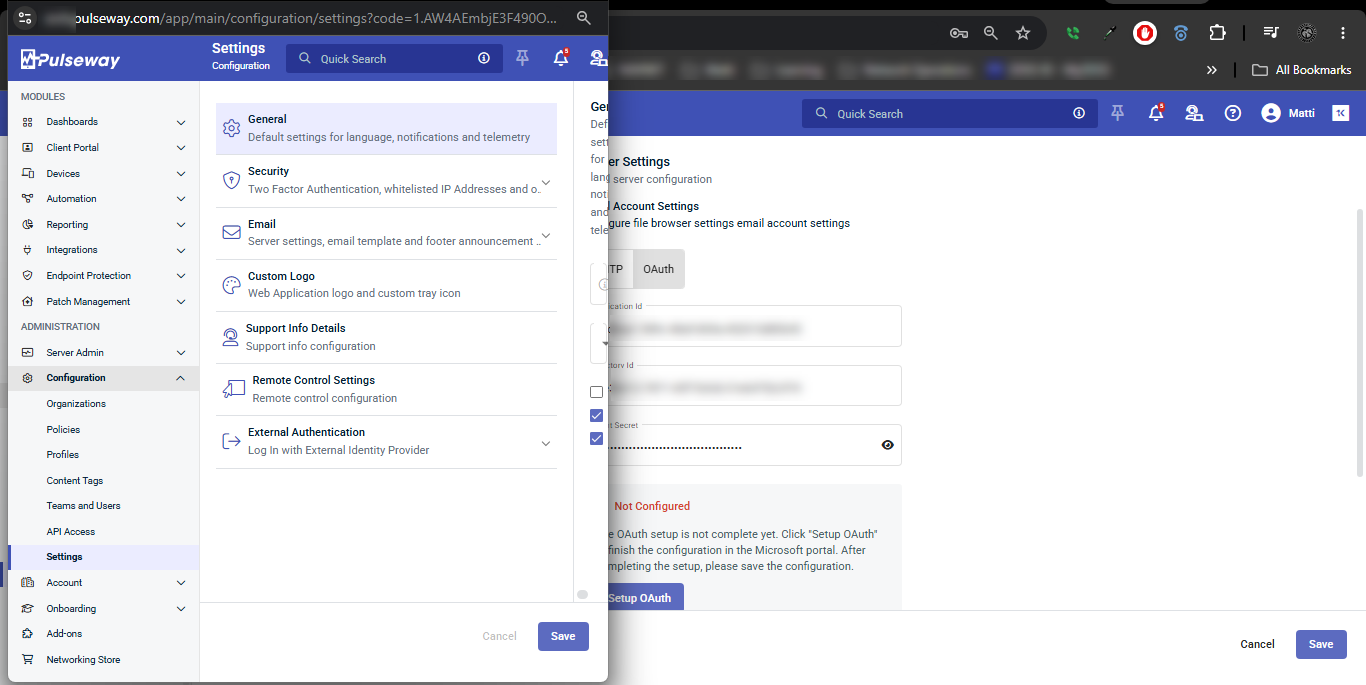
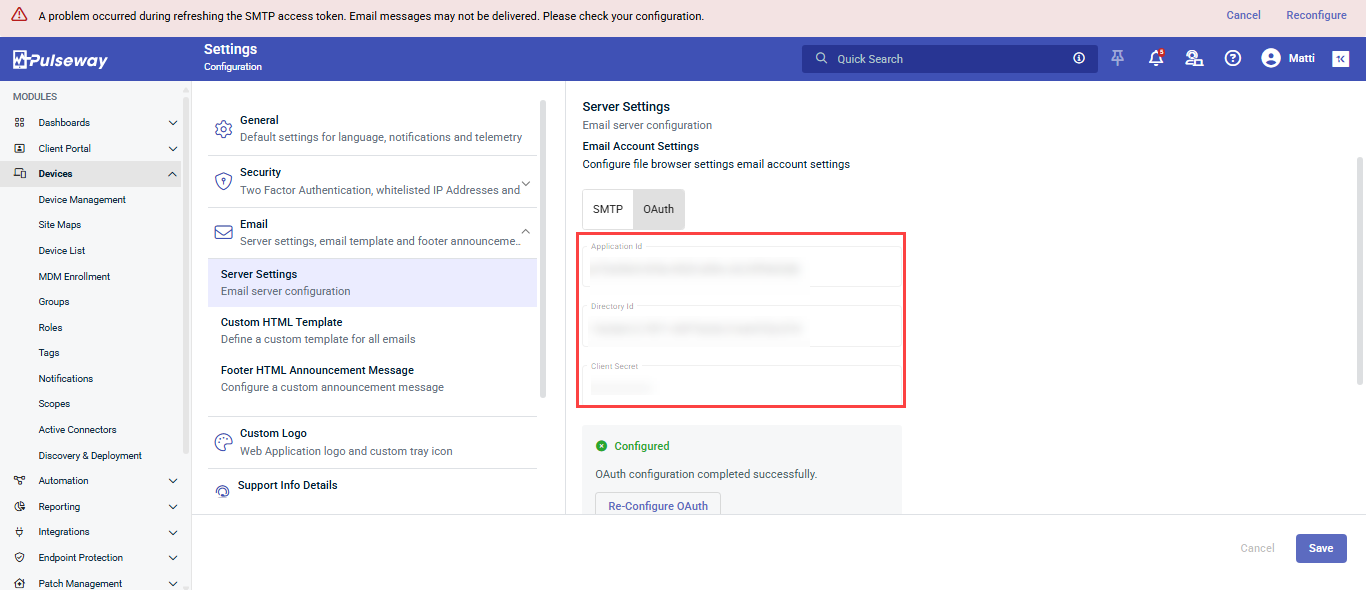
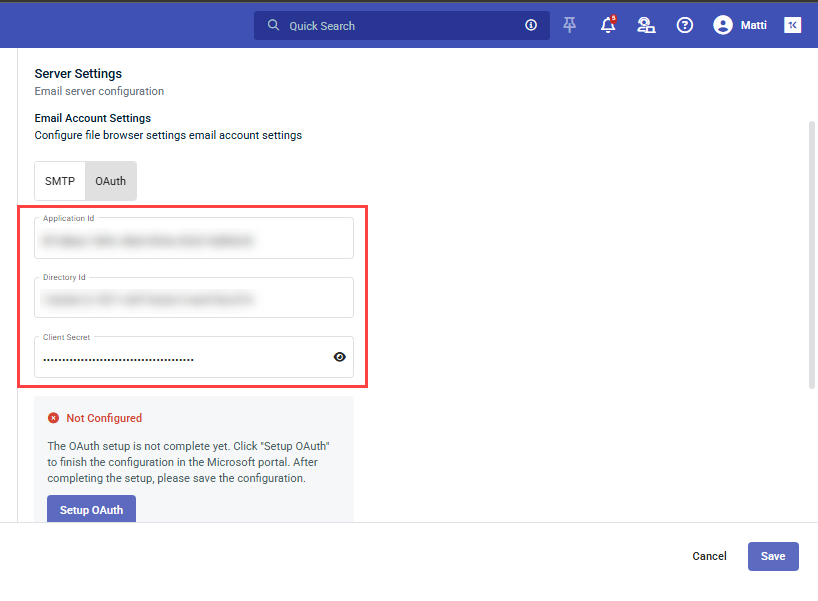
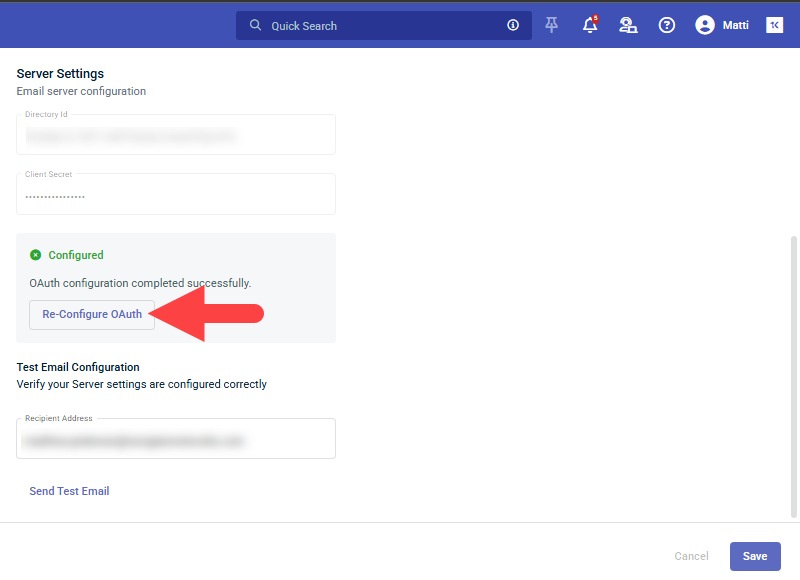
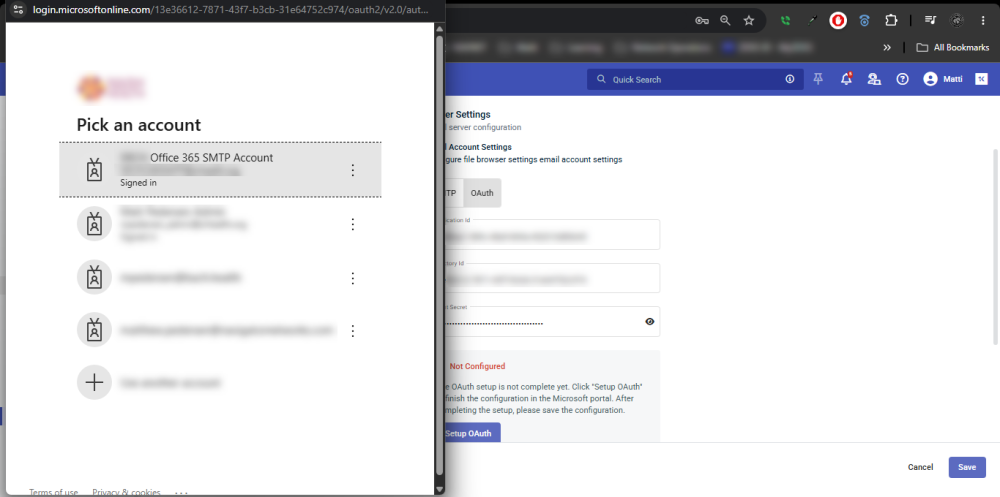
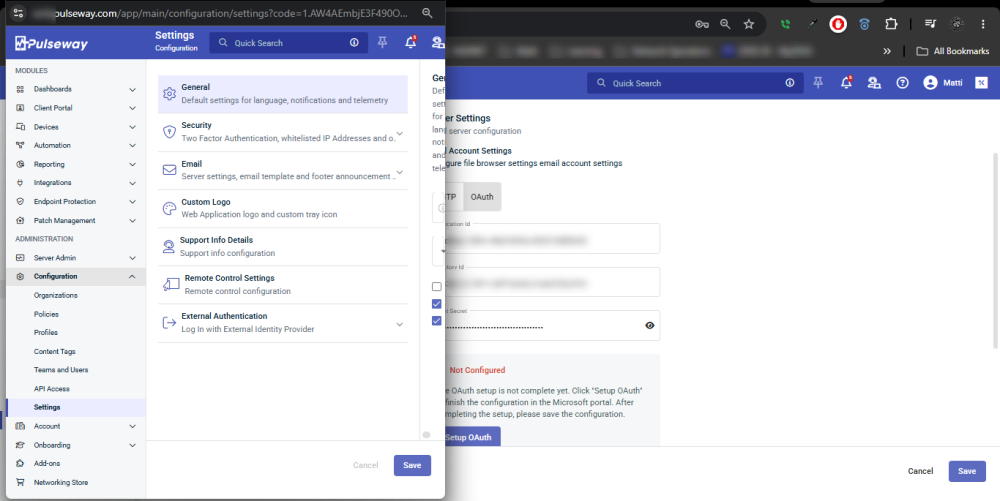
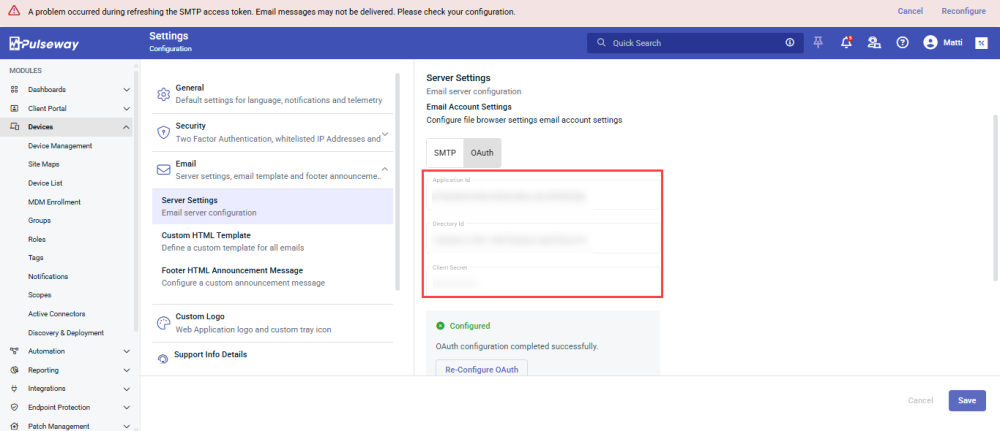
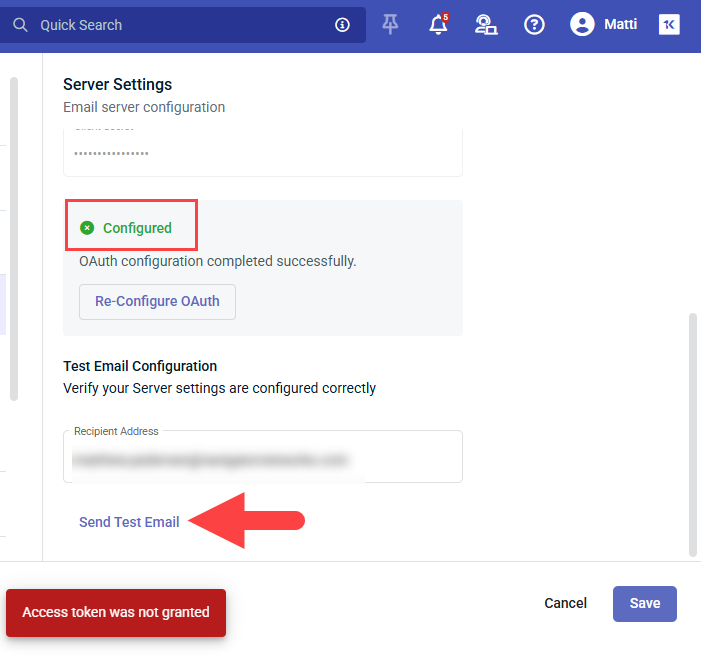
We're running into this same issue. I've come across a few bugs in regard to the OAuth 2.0 Email Settings. Firstly, when you attempt to "Re-Configure OAuth", it won't even open the login.microsoftonline.com window, to allow you to Select an alternative Account. It simply activates the "Application Id", "Directory Id" and "Client Secret" Fields, but after re-submitting, it assumes that you want to use the same Email Account/Credentials. I actually had to completely Delete our original "Pulseway RMM" App Registration and create a new one, from scratch, with a new "Application Id", "Directory Id" and "Client Secret", before it would the Pulseway Email Settings Web UI would actually open the login.microsoftonline.com Window, allowing me to select another Email Account. Unfortunately, there is a bug in this process, as well. I say this because after successfully signing into the correct O365 Account, it doesn't return to the original Pulseway Email Settings window, but rather, it loads the Email Settings page directly into the Microsoft Sign-in window. Worse yet, when I maximize this window, I find that the OAuth Form contains the "Application Id", "Directory Id" and "Client Secret" from the old/Deleted App Registration, which still says that it is "Configured", for some reason. Of course, when you attempt to click on the "Send Test Email" option, it immediately fails, with an "Access Token was Not Granted" Message. I've gone over the App Registration Settings multiple times and I am confident that the App Registration Settings are correct. That being said, there appears to be no working method for changing an OAuth SMTP Email Address, at least for the present time. Any assistance you can provide with this issue, will be greatly appreciated. Thank you, in advance. P.S. It might also be a good idea to update your documentation to inform admins that the account you're authenticating with, will be the account from which Emails/Alert messages will be sent (since many apps require "Application" MS Graph API Permissions, as opposed to "Delegated" Permissions).
-
Yes, system files and BIOS level settings can definitely affect stability, but it depends on what kind of software you’re running. For normal monitored machines, I’d first check the basics: CPU/RAM usage, background services, drivers, storage health, logs, and whether Pulseway is reporting spikes at the same time the app slows down. In many cases the issue is not the BIOS file itself, but drivers, virtualization settings, power settings, or missing dependencies. For emulated software, BIOS or low level system files matter more because the app may depend on them to boot or behave correctly. If those files are missing, wrong region/version, corrupted, or placed in the wrong folder, you can see crashes, black screens, or poor performance. My first checks would be: update drivers, confirm the app dependencies, check event logs, test with a clean config, and compare performance before and after changing any BIOS or emulator settings.
-
Great explanation and helpful clarification from the support team, it really clears up the confusion and makes the plugin setup process much easier for beginners. It’s always good to see quick responses that help developers stay on track. Discussions like this also help others facing similar setup issues, just like finding useful resources around Spotify IPA for learning and testing environments.
-
We just faced a somewhat similar issue where on new computer installs everything worked normally until after a while (seemed like an hour or two) when Pulseway lost the ability to run (Powershell) scripts and the Pulseway Powershell prompt would bring up the following error: Could not load type 'MM.Framework.Utils.Native.NativeProcess' from assembly 'MMUtilsFw, Version=6.6.1.1101, Culture=neutral, PublicKeyToken=((REDACTED))' I narrowed it down to the issue beginning when the Pulseway agent updated itself to 9.2.6. I was able to solve the issue by using the very latest install agent (MSI) and using it over the previous PW install which interestingly enough, didn't give me the option to repair/uninstall Pulseway but I did need to shut down Pulseway from running for it to proceed. Fortunately, I'm not seeing this on previous Pulseway installs, just the ones starting from the past couple of months where I was using an "old" MSI install agent.
- 5 replies
-
- bug report
- fail
- installation
- upgrade
-
Tagged with: