Our Servers are scheduled to Install Windows Updates at 11:30 PM PST on each 3rd Wednesday of the month, then Reboot at 1:00 AM PST the following Thursday morning. However, for some reason, one of our Hyper-V Hosts decided to Install a Cumulative Update, then immediately Reboot, at 9:00 AM PST on Wednesday Morning.
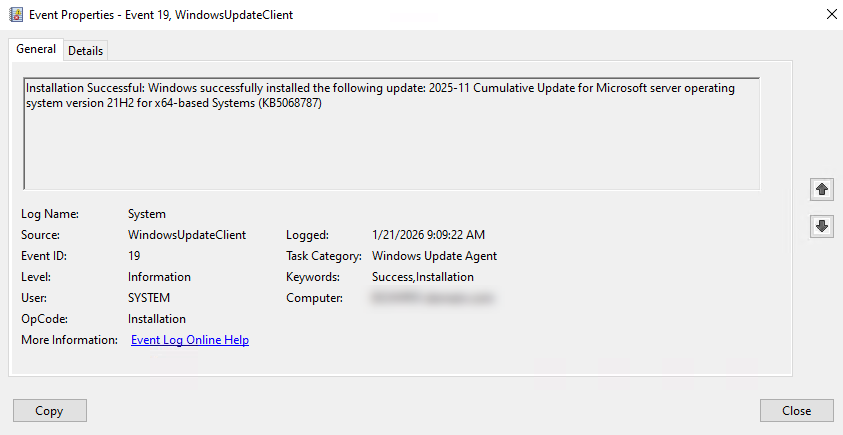
The Windows Update logs confirm that the Updates were deployed, via Pulseway (PCMonitorSrv.exe).
{D934947F-04B7-4F2C-86B0-B52D9C5E394A} 2026-01-21 09:09:18:139-0800 1 183 [AGENT_INSTALLING_SUCCEEDED] 101 {950FCABA-70B8-4039-9ECF-0B0D80D79A9B} 1 0 <<PROCESS>>: PCMonitorSrv.exe Success Content Install Installation Successful: Windows successfully installed the following update: 2025-11 Cumulative Update for Microsoft server operating system version 21H2 for x64-based Systems (KB5068787) JBNdiCryxkKHTHpR.8.0.0.3.0.0



_a9c1b4.png)
_49ee3f.png)
Our Servers are scheduled to Install Windows Updates at 11:30 PM PST on each 3rd Wednesday of the month, then Reboot at 1:00 AM PST the following Thursday morning.
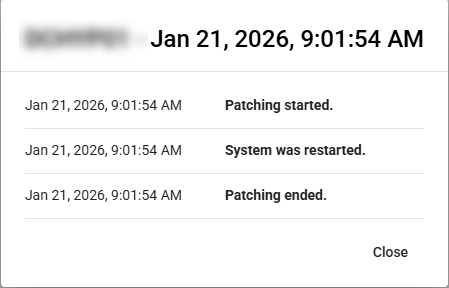
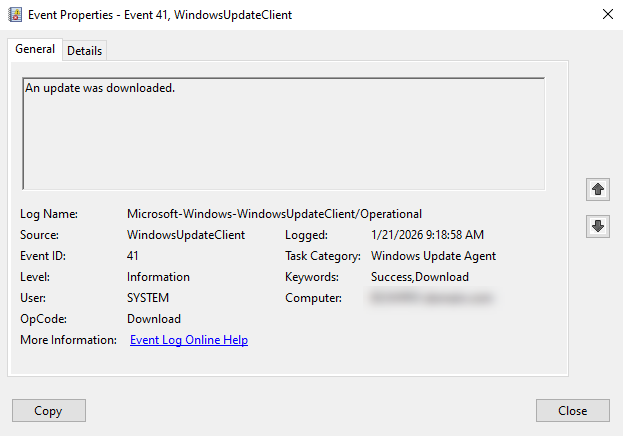
However, for some reason, one of our Hyper-V Hosts decided to Install a Cumulative Update, then immediately Reboot, at 9:00 AM PST on Wednesday Morning.
The Windows Update logs confirm that the Updates were deployed, via Pulseway (PCMonitorSrv.exe).
{D934947F-04B7-4F2C-86B0-B52D9C5E394A} 2026-01-21 09:09:18:139-0800 1 183 [AGENT_INSTALLING_SUCCEEDED] 101 {950FCABA-70B8-4039-9ECF-0B0D80D79A9B} 1 0 <<PROCESS>>: PCMonitorSrv.exe Success Content Install Installation Successful: Windows successfully installed the following update: 2025-11 Cumulative Update for Microsoft server operating system version 21H2 for x64-based Systems (KB5068787) JBNdiCryxkKHTHpR.8.0.0.3.0.0